PushMetrics uses a layered permissions model that lets you control who can access your reports, notebooks, database connections, and integrations.
Default Access
Every report, notebook, database connection, and integration you create is private by default — only you and workspace admins can access it.
Sharing Options
Click the Share button in the top-right corner of a report or notebook to open the sharing menu:
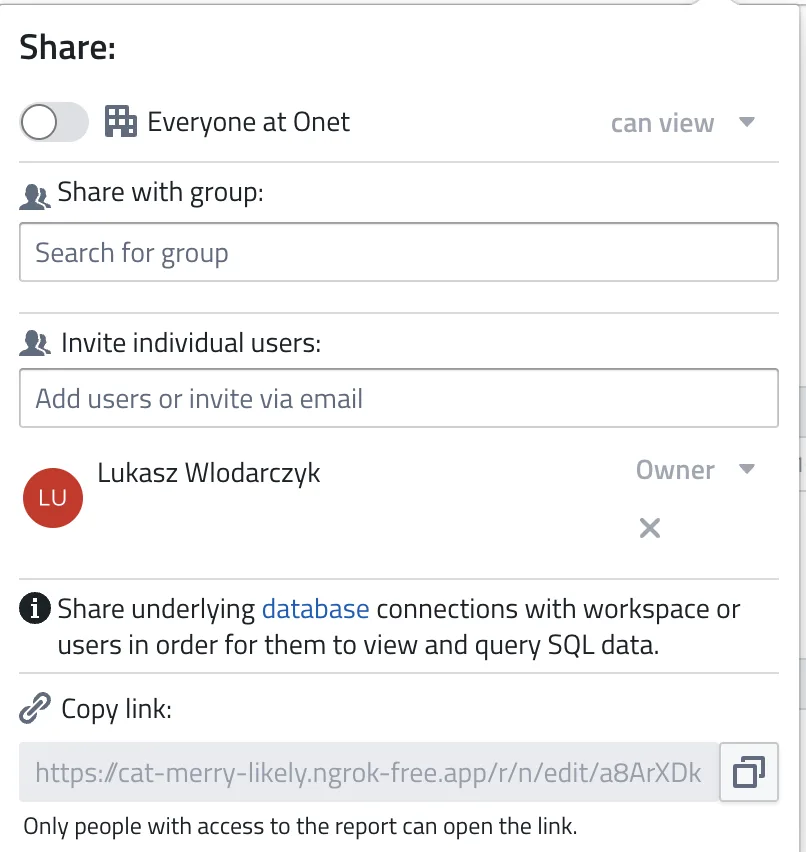
The sharing dialog has the following options:
Everyone at your workspace
Toggle this on to grant access to all users in your workspace. The option is labelled with your own workspace name, for example Everyone at Acme Analytics. You can choose the permission level from the dropdown — for reports and notebooks that is can view or can edit.
Share with group
Search for and select pre-defined user groups for team-based access control. Groups can be managed by admins.
Invite individual users
Search for existing users or invite new ones by email. Each user can be assigned a different permission level. Invited users receive an email notification.
Note: Share underlying database connections with workspace or users in order for them to view and query SQL data.
Copy link
Copies a direct link to the item. Only people with access to the report can open the link.
Sharing many reports at once
The dialog above shares one report. To share a whole batch — every report in a folder, say — select them in the report list and use the Share action in the bulk actions menu instead. See Sharing Many Reports at Once.
Bulk sharing only ever adds access; it never removes it. Removing a share is always done here, on the individual report.
Permission Levels
PushMetrics has three permission levels, each building on the previous:
| Permission | What it allows |
|---|---|
| Can view | See the item and its contents (read-only) |
| Can use | Everything in view, plus using database connections or integrations in blocks |
| Can edit | Everything in use, plus modify the item and manage its sharing settings |
Permissions are hierarchical: edit includes use, which includes view.
Not every level applies to every resource. Reports and notebooks are shared as can view or can edit only — can use does not apply to them, and the sharing dialog will not accept it.
What Can Be Shared
| Resource | View | Use | Edit |
|---|---|---|---|
| Reports & Notebooks | See content and results | Not applicable — reports are shared as can view or can edit | Modify blocks, settings, sharing |
| Database Connections | See the connection exists | Run queries against it | Modify connection settings |
| Integrations (Slack, Tableau, etc.) | See the integration exists | Use it in blocks | Modify configuration |
Sharing Reports vs. Database Connections
Reports and database connections have separate permissions. Sharing a report does not automatically grant access to the database connections used in it.
If a collaborator needs to both view and execute a report, you must share:
- The report (can view is enough to see it; can edit also lets them change it)
- The database connection(s) used in the report (with at least can use permission)
PushMetrics will prompt you to share the relevant databases when you invite someone to a report who doesn't have access to them yet.
User Roles
There are three account-level roles that determine what a user can do across the workspace. See User Management for details.
| Role | Create content | Access shared content | Access all content | Manage users |
|---|---|---|---|---|
| Admin | Yes | Yes | Yes (all items) | Yes |
| User | Yes | Yes (shared items) | No | Can invite |
| Guest | No | Yes (shared items) | No | No |
Admins always have full access to every resource in the workspace, regardless of sharing settings.
Workspace Isolation
All sharing and permissions are scoped to a single workspace. Users can belong to multiple workspaces but have separate roles and access in each one. Sharing a report in one workspace does not affect any other workspace.