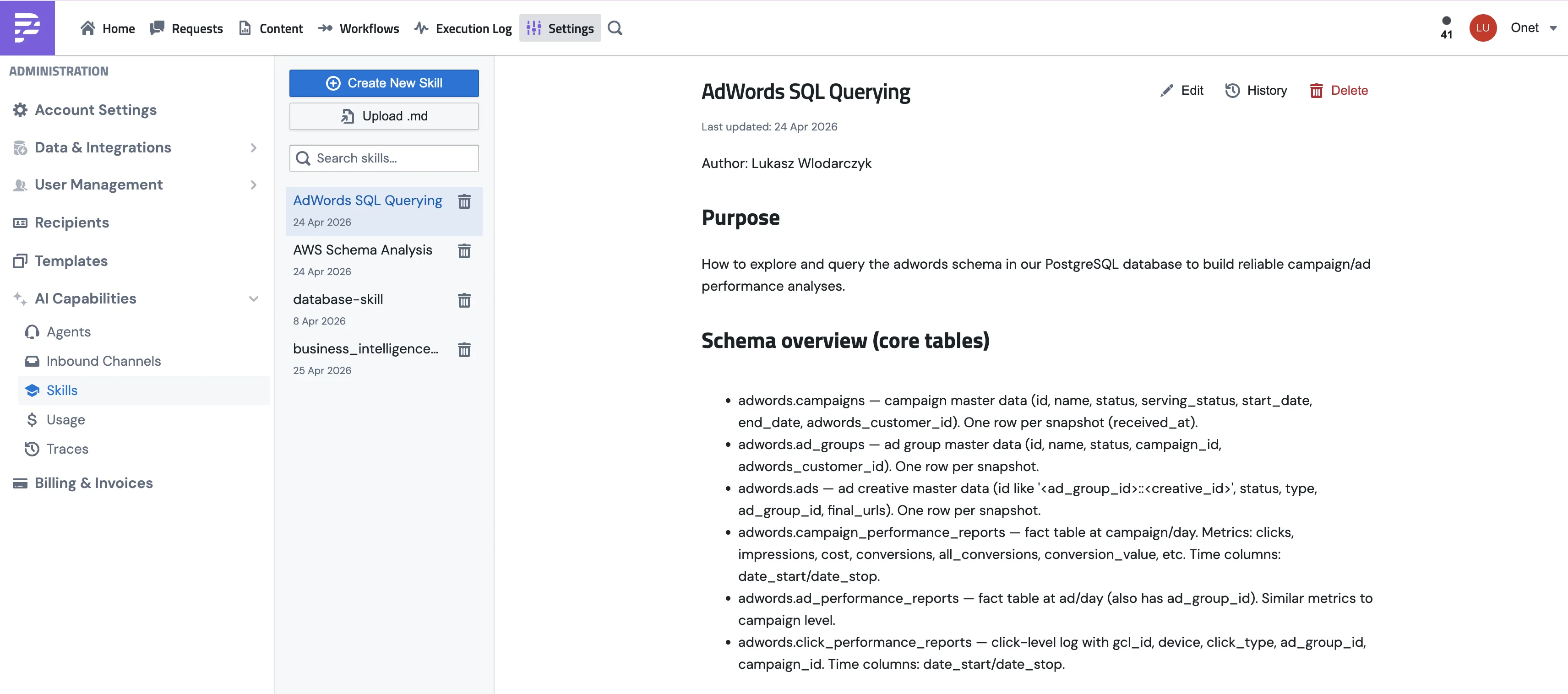
A skill is a short instruction sheet your agents follow. A recipe, a playbook, pick your metaphor. Anything your team does the same way every time (the weekly pipeline report, the monthly board update, the new-customer welcome sequence) is a good candidate.
Skills are markdown files with a short YAML header, saved in your workspace. The header is what the agent reads to decide whether the skill is relevant; the body is the playbook it follows. Once a skill exists, you can ask any agent with access to it to "run the weekly pipeline report" and it'll work through the steps you wrote.
Where skills live
Skills are stored as blocks, the same building block your SQL queries, email templates, and metrics views live in. Manage them under Settings → AI Capabilities → Skills.
The Skills page is split: the list of skills on the left, the editor on the right. The editor itself has markdown source on one side and a live preview on the other. Every save creates a new version in the skill's history, so you can always see what changed, who changed it, and roll back if something goes sideways. Edits made by agents are tagged differently from edits made by humans.
AnswerADataQuestion (how the agent answers data questions through your metrics views) and AuthoringDomainKnowledge (how to write a domain-knowledge skill) — appear in every workspace automatically and are refreshed with each PushMetrics release. Treat them as read-only: an in-place edit will be replaced by the next release's version. If you want a different playbook, create your own skill under a different name — the refresh never overwrites skills your team creates. One caveat: a custom skill that reuses a built-in's name blocks that built-in from appearing or refreshing in your workspace (the refresh skips it rather than touch your work); rename or delete the custom skill to get the built-in back.What does a skill look like?
Markdown with a small YAML header. The header is the routing contract — it tells the agent what the skill is for. The rest is the playbook.
---
name: WeeklyPipelineReport
description: Build and deliver the weekly sales pipeline summary — pulls the Pipeline Summary SQL, charts deals by stage, posts to #sales-updates, emails the Sales Leadership group. Use when someone asks for the weekly pipeline report or Monday rollup.
category: Reporting
---

# Weekly Pipeline Report

When someone asks for the weekly pipeline report:

1. Run the "Pipeline Summary" SQL block to pull this week's data.
2. Build a bar chart of deals by stage.
3. Post the chart and a short summary to #sales-updates on Slack.
4. Email the full table to the "Sales Leadership" group.

Always include a week-over-week comparison in the Slack message.
Without the skill, you'd be explaining those four steps every Monday morning. With it, you write it once and ask for the weekly pipeline report by name.
Skill anatomy — the YAML header
Three fields do the routing work. The agent sees them in its system prompt at the start of every session and uses them to decide which skill matches the user's question.
name
Required
WeeklyPipelineReport). Max 64 chars, no spaces. Shows as the skill's title in the agent's index.
description
Required
The routing signal
category
Optional
Reporting, Data, Integrations). Clusters related skills in the agent's index. Defaults to General.
Four more optional fields match the Agent Skills specification — useful for attribution and skill marketplaces, not load-bearing for routing:
allowed-tools
run_sql search_tables). Surfaced in the agent's index as a hint.
license
MIT, Internal). Shown next to the skill in the index.
compatibility
PostgreSQL 14+). Shown next to the skill in the index.
metadata
name and description are present and useful. If they're missing — or if you saved a legacy skill with a heading-as-description like "## Purpose" — the workspace LLM reads the body and generates the header for you. Writing the header yourself is faster, cheaper, and more accurate, but you won't end up with a skill that nobody can find.Creating a skill
.md files and creates one skill per file. Handy if you're migrating from another system.For a longer worked example that combines a skill with structured forms, see Combining skills and forms.
What makes a good skill
Common ways skills get flaky:
- A vague
descriptionin the header. "This is the pipeline skill" gives the agent nothing to match against. "Builds and delivers the weekly sales pipeline summary — pulls the Pipeline Summary SQL, charts deals by stage, posts to #sales-updates, emails the Sales Leadership group" is what you want. - Vague verbs in the body like "analyze the data" or "summarise nicely". Be concrete: "build a bar chart of deals by stage", "include the week-over-week change in the first paragraph".
- Block or table names that don't actually exist in the workspace. The agent will hunt for them and come back empty-handed.
- Two skills that overlap. The agent has to pick one, and you might not love its choice. If they really cover the same thing, merge them. If they're subtly different, the descriptions need to spell out the difference.
Which agents see which skills?
Each agent decides which skills it loads. You set that on the agent's edit page, in the Skills section.
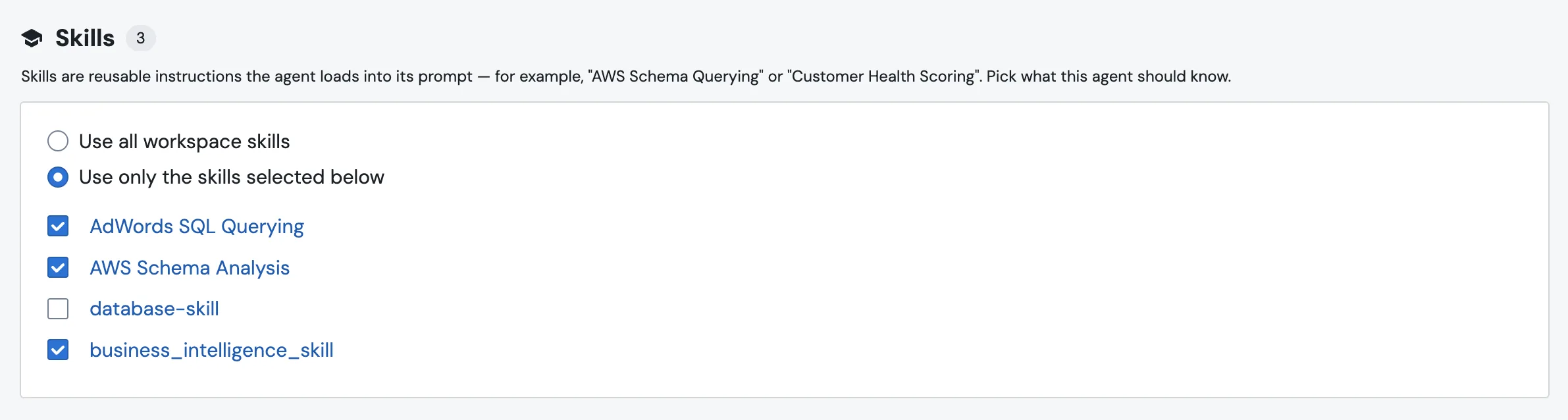
There's a radio toggle with two modes:
Checkboxes save the moment you click. There's no separate Save button. Each row links to the skill's detail page, so you can read what's inside before assigning it.
How an agent uses a skill
At the start of every session the system prompt is seeded with an index of every skill the agent has access to: name, description, and category — pulled straight from each skill's YAML header. Skills are grouped by category so a 30-skill workspace stays scannable. The full body of each skill is not loaded up front, because doing that would torch your token budget for skills you don't end up using.
The agent matches the user's question against the description, not the name. That's why a concrete one-sentence description in the header matters more than a clever name: it's the routing signal the agent reads to decide which skill is relevant.
When the agent decides a skill is relevant, it calls a tool to fetch the full markdown:
You can also point at a skill explicitly: "Use the Weekly Pipeline Report skill." That's the most reliable way to make sure the right playbook gets picked on the first try, especially if you have several skills covering related areas.
Seeing skills in action
When the agent reads a skill mid-conversation, the chat shows a compact indicator instead of a raw tool call. You'll see "💡 Using skill: WeeklyPipelineReport" with a link straight to the skill's detail page — handy for spot-checking what playbook the agent decided to follow.
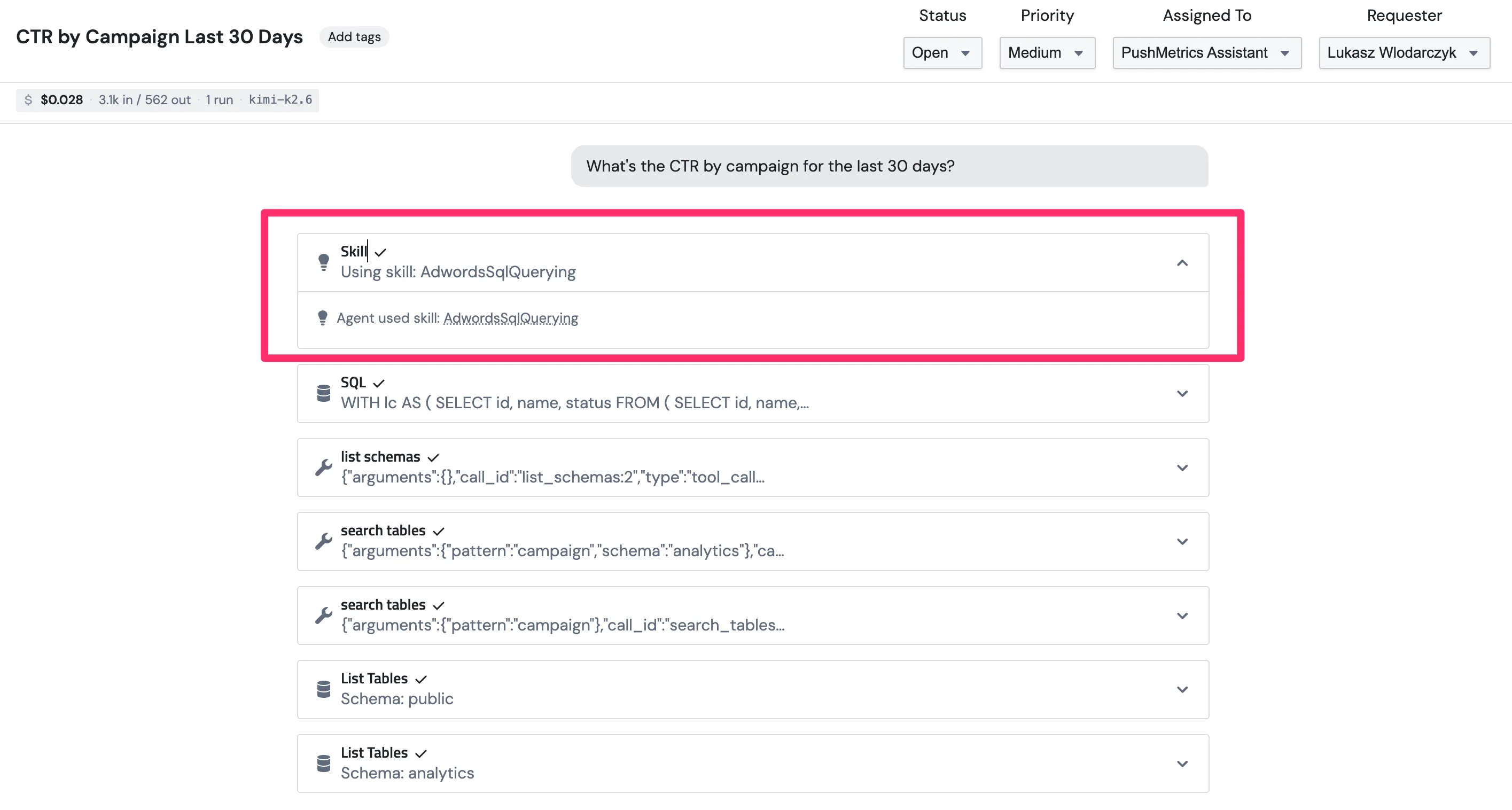
If you ever wonder "did the agent actually use my skill, or did it just guess?" — the indicator answers that question without you having to open the trace.
Editing skills (yours and the agent's)
Skills live in the same place regardless of who wrote them. The agent works with them through the same block tools you'd use from the UI:
list_blocksto see what's there.read_blockto open one.create_blockto add a new skill.edit_blockto update an existing one.
Every change is recorded in the skill's history. Agent edits are tagged differently from human ones, so you can scan the history at a glance and roll back if the agent's "improvement" wasn't.
Skill vs memory
These two get confused. The quick version:
- A skill is how to do something: step-by-step instructions for a recurring task. Workspace-wide, available to any agent.
- A memory note is something one agent should keep in mind: rules, definitions, or things it picked up itself between conversations. Private to that agent.
See Agent Memory for the memory side.