With PushMetrics, you can prompt OpenAI models as part of your workflow. Use models like GPT-4o, GPT-4 Turbo, o1, o3, and more to analyze data, generate summaries, draft content, or add AI-powered intelligence to your reports.
You can use data from other tasks (e.g. SQL data) inside the prompt and use the response message in other tasks (e.g. in an Email).
Supported Models
PushMetrics supports all models available through the OpenAI API, including:
- GPT-4o — OpenAI's most capable multimodal model. Fast and cost-effective. Recommended for most use cases.
- GPT-4o mini — smaller, faster, and cheaper variant of GPT-4o. Good for simple tasks.
- GPT-4 Turbo — high-capability model with a large context window.
- GPT-4 — the original GPT-4 model.
- GPT-3.5 Turbo — fast and inexpensive. Suitable for simpler prompts.
- o1 — OpenAI's reasoning model. Best for complex analysis, math, and multi-step reasoning.
- o3 — latest reasoning model with improved performance.
- o3-mini — smaller reasoning model, faster and more cost-effective.
The available models depend on your OpenAI integration configuration. If you use PushMetrics' default integration, the most popular models are available. If you configure your own API key, all models accessible to your OpenAI account will be available.
Creating a Prompt
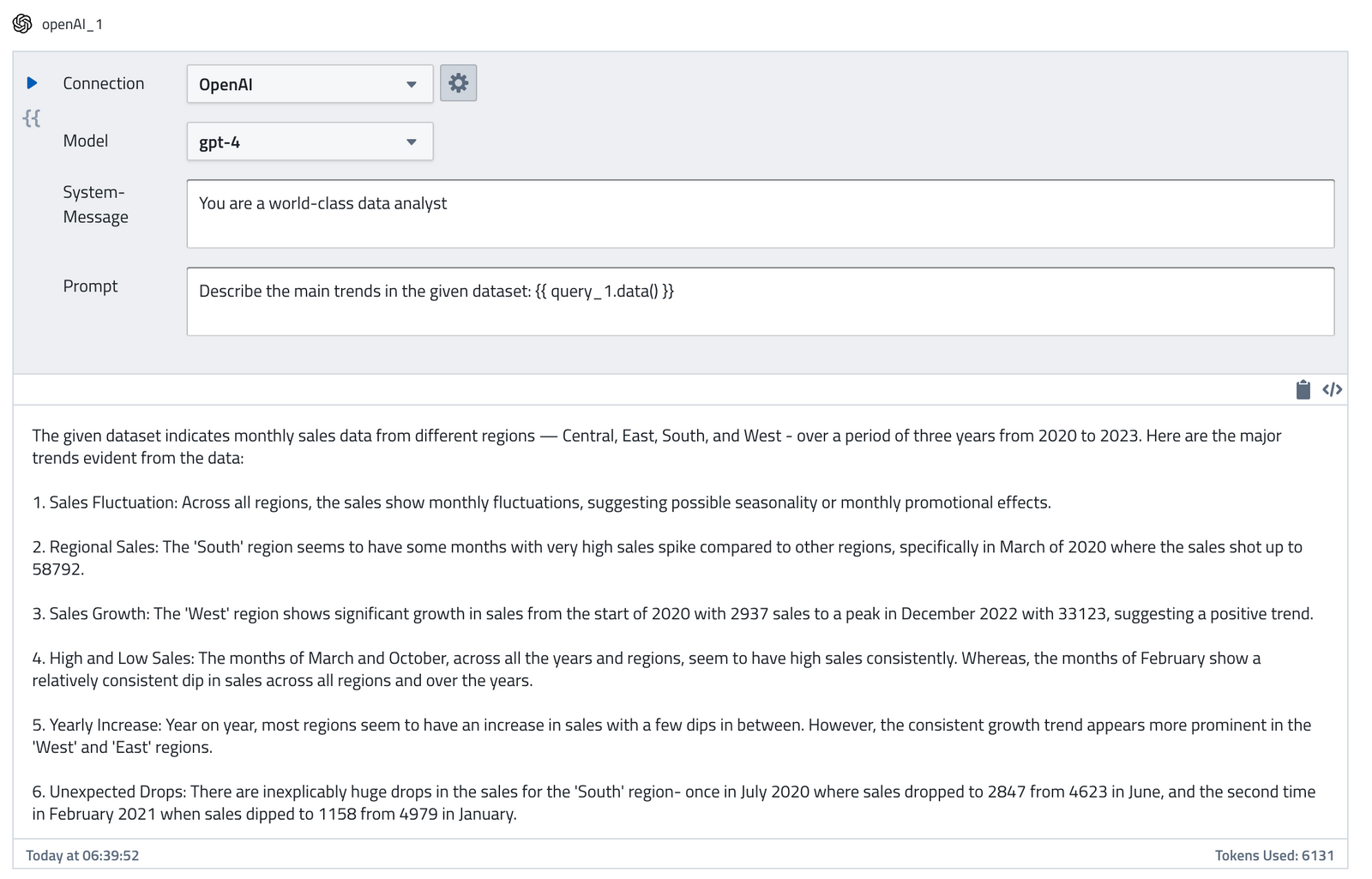
The OpenAI task takes the following inputs:
- Connection: You can choose which OpenAI integration to use
- Model: The OpenAI model you want to use for your prompt
- System Message: The system message can be used to specify the persona used by the model in its replies.
- Prompt: The user message the AI model should respond to
Using the Response Message
You can use the response message in other tasks using the following syntax:
{{ openAI_1.data.choices[0].message.content }}
A shortcut to copy this referenced to the clipboard is provided:
You can inspect the full response of the OpenAI API by clicking on the </> button:
It is also available as follows:
{{ openAI_1.data }}
Using Data from Other Tasks in Prompts
Both the System Message and Prompt fields support Jinja templating. This means you can inject data from SQL queries, API calls, or parameters directly into your prompts:
Summarize the following sales data:

{% for row in query_1.data %}
- {{ row.region }}: ${{ row.revenue }} ({{ row.growth_pct }}% growth)
{% endfor %}

Highlight the top performing region and any areas of concern.
This makes it easy to build data-driven AI prompts that produce insights tailored to your latest query results.
Use Cases
- Data summarization — pass SQL query results to GPT and ask for a natural language summary for stakeholders.
- Anomaly detection — prompt the model to identify unusual patterns in your data.
- Content generation — generate report narratives, email copy, or Slack message text from data.
- Data classification — categorize text data (support tickets, feedback) using AI.
- Translation — translate report content for international teams.